一键登录
概述
号码认证服务包含本机号码认证和一键登录两个不同的功能,使用场景不一样,无需一起使用。
本机号码认证使用场景:用户输入手机号码,通过SDK获取token(通过getVerifyTokenWithTimeout获得),服务端携带输入的手机号码和token去运营商网关进行校验(服务端调用VerifyMobile接口),返回的结果是用户当前上网使用的号码与输入的号码是否一致。
一键登录使用场景:用户无需输入手机号码,SDK会拉起授权页,用户确认授权后,SDK会获取token(通过getLoginTokenWithTimeout获得),服务端携带token到运营商网关获取用户当前上网使用的号码(服务端调用GetMobile接口),并返回给App服务端。
1.3.0版本升级说明
1.删除工程中TYRZResource.bundle
2.+ (void)checkEnvAvailableWithComplete:(void (^_Nullable)(NSDictionary _Nullable resultDic))complete;接口改为+ (void)checkEnvAvailableWithAuthType:(UMPNSAuthType)authType complete:(void (^_Nullable)(NSDictionary _Nullable resultDic))complete;并增加UMPNSAuthType分为服务类型 UMPNSAuthTypeVerifyToken 本机号码校验流程,UMPNSAuthTypeLoginToken 一键登录流程。
准备工作
a) 请确保您的终端设备已经开启了4G网络(联通、移动支持3G网络,但接口耗时会增加)
b) 请确保已经在友盟+控制台开通了号码认证服务并创建了对应的方案,点击进入友盟+控制台。方案创建成功后,联通电信可立即使用,移动需等待10分钟后使用。
c) 您也可以登录友盟+官网查看接入流程,点击查看完整使用流程。
欢迎观看友盟学院出品《U-Verify iOS集成操作》,帮助开发者快速集成
认证流程
调用接口setVerifySDKInfo,初始化SDK秘钥参数调用接口checkEnvAvailableWithAuthType,检查及准备SDK环境调用SDK认证Token接口getVerifyTokenWithTimeout调用开发者服务端API认证接口
运行demo工程
解压后包含UMVerifyDemo工程,您需要将AppKey、bundleID和开发者证书修改为您自己的。
开发环境搭建
1.添加主库
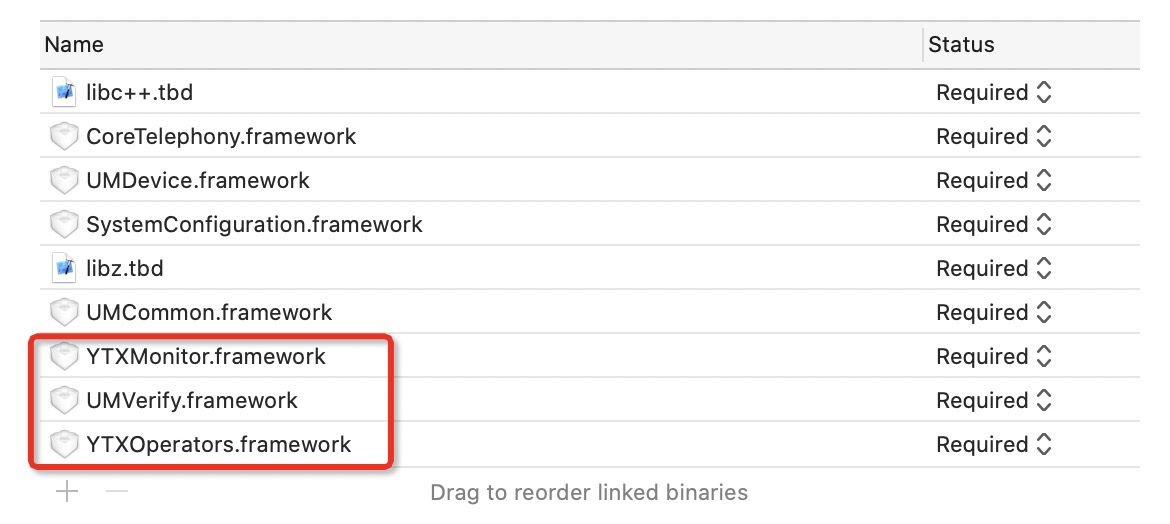
Targets->General->Linked Frameworks and Librarie中添加主库UMVerify.framework,YTXMonitor.framework,YTXOperators.framework;
2.Targets->BuildSettings设置
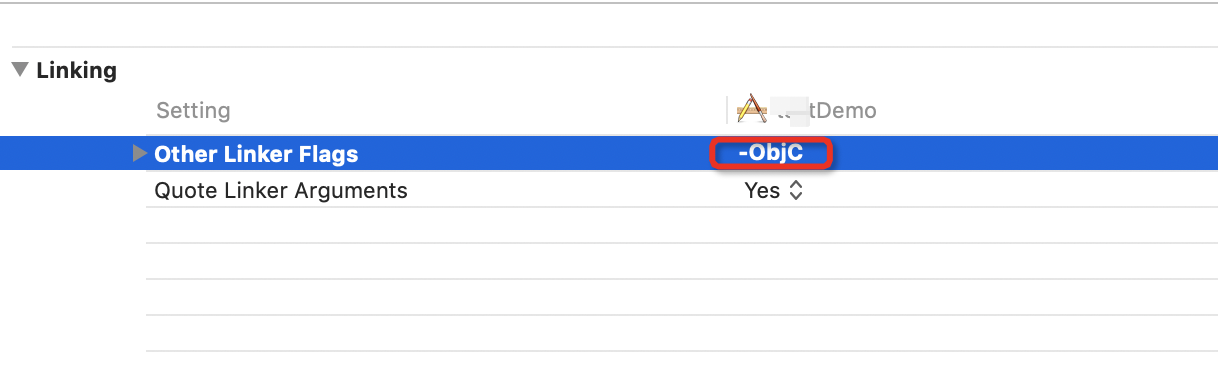
Targets->BuildSettings 中 , Other Linker Flags增加-Objc,一定要添加此项,注意是大写C,不是小写c,否则工程运行会crash!
3.Targets->Info设置

4.添加资源文件
主项⽬右键添加下ATAuthSDK.bundle资源⽂件,否则⼀键登录授权⻚⾯默认的图⽚或icon显示不出来;
SDK 使用说明
SDK功能介绍
友盟+号码认证iOS SDK目前主要提供功能,目前仅提供静态库UMVerify.framework形式。获取SDK版本号。SDK接口调用环境检查及准备,检测设备是否开启蜂窝数据网络,且配置SDK相关数据,该步骤是本机号码认证及一键登录功能可以使用的前提条件。一键登录LoginNumber接口(支持移动,电信,联通三大运营商),是预取号缓存接口,为LoginToken接口缓存前置条件,加快授权页的唤起速度。一键登录LoginToken接口(支持移动,电信,联通三大运营商),请求一键登录的凭证,可自定义超时时间,默认3.0s,单位s。
一键登录接口调用说明
1)调用接口setVerifySDKInfo ,初始化SDK秘钥参数2)(可选)调用SDK接口checkEnvAvailableWithAuthType,检查当前环境是否支持一键登录3)(可选)调用SDK预取号接口accelerateLoginPageWithTimeout,调用该接口可以加快授权页唤起的速度,请先进行登录态判断后,确保用户需要登录再调用此接口,否则您的功能可能会被限流。4) 调用SDK一键登录token接口getLoginTokenWithController。5) 调用服务端getMobile接口获取最终号码。6)(可选)调用接口cancelLoginVCAnimated,注销授权页面
SDK方法说明
主类UMCommonHandler接口简介
获取sdk版本号(getVersion)
/**
  * 函数名:getVersion
   * @param 无
   * @return 字符串,sdk版本号
 */
-(NSString*_Nonnull)getVersion;
设置SDK秘钥(setVerifySDKInfo)
/**
    * 函数名:setVerifySDKInfo
    * @brief 初始化SDK调用参数,app生命周期内调用一次
    * @param  方案对应的秘钥,请登录友盟+控制台后,进入认证方案管理,点击秘钥后复制秘钥,建议维护在业务服务端
    * @param complete 结果同步回调,成功时resultDic=@{resultCode:600000, msg:...},其他情况时"resultCode"值请参考PNSReturnCode
*/
-(void) setVerifySDKInfo:(NSString*_Nonnull)info complete:(void(^_Nullable)(NSDictionary*_Nonnull resultDic))complete;
检查认证环境(checkEnvAvailableWithAuthType)
/**
 *  检查当前环境是否支持一键登录或号码认证,resultDic 返回 PNSCodeSuccess 说明当前环境支持
 *  @param  authType 服务类型 UMPNSAuthTypeVerifyToken 本机号码校验流程,UMPNSAuthTypeLoginToken 一键登录流程
 *  @param  complete 同步结果回调,成功时resultDic=@{resultCode:600000, msg:...},其他情况时"resultCode"值请参考PNSReturnCode,只有成功回调才能保障后续接口调用
 */
+(void)checkEnvAvailableWithAuthType:(UMPNSAuthType)authType complete:(void(^_Nullable)(NSDictionary*_Nullable resultDic))complete;
一键登录预取号(accelerateLoginPageWithTimeout)
/**
     * 函数名: accelerateLoginPageWithTimeout
    * @brief 加速一键登录授权页弹起,防止调用 getLoginTokenWithTimeout:controller:model:complete: 等待弹起授权页时间过长
     * @param timeout:接口超时时间,单位s,默认3.0s,值为0.0时采用默认超时时间
     * @param complete 结果异步回调,成功时resultDic=@{resultCode:600000, msg:...},其他情况时"resultCode"值请参考PNSReturnCode
*/
+(void)accelerateLoginPageWithTimeout:(NSTimeInterval)timeout complete:(void(^_Nullable)(NSDictionary*_Nonnull resultDic))complete;
*接口返回,如果非PNSCodeSuccess返回可以做容错处理:建议转到其它登录方式
一键登录获取token(getLoginTokenWithTimeout)
/**
     * 函数名: getLoginNumberWithTimeout
     * @brief    获取一键登录Token,调用该接口首先会弹起授权页,点击授权页的登录按钮获取Token
     * @warning     注意的是,如果前面没有调用 accelerateLoginPageWithTimeout:complete: 接口,该接口内部会自动先帮我们调用,成功后才会弹起授权页,所以有一个明显的等待过程
     * @param    timeout: 接口超时时间,单位s,默认3.0s,值为0.0时采用默认超时时间
    * @param    controller 唤起自定义授权页的容器,内部会对其进行验证,检查是否符合条件
    *@param    model自定义授权页面选项,可为nil,采用默认的授权页面,具体请参考UMCustomModel.h文件
    * @param    complete 结果异步回调,"resultDic"里面的"resultCode"值请参考PNSReturnCode,如下:
    授权页控件点击事件:700000(点击授权页返回按钮)、700001(点击切换其他登录方式)、
    700002(点击登录按钮事件,根据返回字典里面的 "isChecked"字段来区分check box是否被选中,只有被选中的时候        *          内部才会去获取Token)、700003(点击check box事件)、700004(点击协议富文本文字)
    接口回调其他事件:600001(授权页唤起成功)、600002(授权页唤起失败)、600000(成功获取Token)、 600011(获取Token失败)、600015(获取Token超时)、600013(运营商维护升级,该功能不可用)、600014(运营商维护升级,该功能已达最大调用次数).....
*/
+(void)getLoginTokenWithTimeout:(NSTimeInterval)timeout controller:(UIViewController*_Nonnull)controller model:(UMCustomModel*_Nullable)model complete:(void(^_Nullable)(NSDictionary*_Nonnull resultDic))complete;
*接口返回,如果非PNSCodeSuccess返回可以做容错处理:参考SDK返回码的建议
调试模式一键登录(debugLoginUIWithController)
/**
 *  此接口仅用于开发期间用于一键登录页面不同机型尺寸适配调试(可支持模拟器),非正式页面,手机掩码为0,不能正常登录,请开发者注意下
 *  @param  controller 唤起自定义授权页的容器,内部会对其进行验证,检查是否符合条件
 *  @param  model 自定义授权页面选项,可为nil,采用默认的授权页面,具体请参考UMCustomModel.h文件
 *  @param  complete 结果异步回调到主线程,"resultDic"里面的"resultCode"值请参考PNSReturnCode
 */
+(void)debugLoginUIWithController:(UIViewController*_Nonnull)controller model:(UMCustomModel*_Nullable)model complete:(void(^_Nullable)(NSDictionary*_Nonnull resultDic))complete;
隐藏授权时关闭loading(hideLoginLoading)
/**
     * 函数名:hideLoginLoading
     * @brief 手动隐藏一键登录获取登录Token之后的等待动画,默认为自动隐藏,当设置 UMCustomModel 实例autoHideLoginLoading = NO 时, 可调用该方法手动隐藏
*/
+(void)hideLoginLoading;
一键登录注销登录页面(cancelLoginVCAnimated)
/**
     * 函数名:cancelLoginVCAnimated
     * @param flag:是否添加动画
     * @param complete成功返回
*/
+(void)cancelLoginVCAnimated:(BOOL)flag complete:(void(^_Nullable)(void))complete;
获取verifyId(getVerifyId)
/**
 *  获取智能认证ID
 */
+(NSString*_Nonnull)getVerifyId;
工具类UMCommonUtils接口简介
判断设备蜂窝网络是否开启(checkDeviceCellularDataEnable)
/**
     * 函数名:checkDeviceCellularDataEnable
*/
+(BOOL)checkDeviceCellularDataEnable;
判断当前上网卡是否是中国联通(isChinaUnicom)
/**
     * 函数名:isChinaUnicom
*/
+(BOOL)isChinaUnicom;
判断当前上网卡是否是中国移动(isChinaMobile)
/**
     * 函数名:isChinaMobile
*/
+(BOOL)isChinaMobile;
判断当前上网卡是否是中国电信(isChinaTelecom)
/**
     * 函数名:isChinaTelecom
*/
+(BOOL)isChinaTelecom;
获取当前上网卡运营商名称(getCurrentCarrierName)
/**
     * 函数名:getCurrentCarrierName
     * @return:中国移动,中国联通,中国电信等
*/
+(NSString*)getCurrentCarrierName;
获取当前上网网络类型(getNetworktype)
/**
     * 函数名:getNetworktype
     * @return:WiFi,4G,3G,2G,NoInternet等
*/
+(NSString*)getNetworktype;
判断设备是否有SIM卡(simSupportedIsOK)
/**
     * 函数名:simSupportedIsOK
     * @return:
*/
+(BOOL)simSupportedIsOK;
判断wwan是否开启(isWWANOpen)
/**
     * 函数名:isWWANOpen
     * @breif:判断wwan是否开启(通过p0网卡判断,无wifi或有wifi情况下都能检测到)
*/
+(BOOL)isWWANOpen;
获取设备当前网络私网IP地址(getMobilePrivateIPAddress)
/**
    * 函数名:getMobilePrivateIPAddress
    * @return:
*/
+(NSString*)getMobilePrivateIPAddress;
一键登录获取手机号
服务端接口,当您成功获取到getLoginToken成功获取token后,将token传递至您的服务端,服务端携带token调用友盟+的getMobile接口即可进行最终的取号操作。
SDK返回码
该返回码为友盟+号码认证SDK⾃身的返回码,请注意600011及600012错误内均含有运营商返回码,具体错误在碰到之后查阅运营商SDK返回码
返回码 | 返回码描述 | 建议 |
600000 | 获取token成功 | 无 |
600001 | 唤起授权页成功 | 无 |
600002 | 唤起授权页失败 | 建议切换到其他登录方式 |
600004 | 获取运营商配置信息失败 | 建议切换到其它登录方式;创建工单联系工程师 |
600007 | 未检测到sim卡 | 建议切换到其它登录方式;或提示用户检查 SIM 卡后重试; |
600008 | 蜂窝网络未开启 | 建议切换到其它登录方式;或提示用户开启移动网络后重试 |
600009 | 无法判断运营商 | 建议切换到其它登录方式;创建工单联系工程师 |
600010 | 未知异常 | 建议切换到其它登录方式;创建工单联系工程师 |
600011 | 获取token失败 | 切换到其他登录方式 |
600012 | 预取号失败 | 切换到其他登录方式 |
600013 | 运营商维护升级,该功能不可用 | 建议切换到其他登录方式;创建工单联系工程师 |
600014 | 运营商维护升级,该功能已达最大调用次数 | 建议切换到其他登录方式;创建工单联系工程师 |
600015 | 接口超时 | 建议切换到其他登录方式 |
600017 | AppID、Appkey解析失败 | 创建工单联系工程师 |
600021 | 点击登录时检测到运营商已切换 | 建议切换到其他登录方式 |
600025 | 终端环境检查失败(终端不支持认证/终端检测参数错误) | 检查接口调用传参是否正确 |
600026 | 授权⻚已加载时不允许调⽤加速 或预取号接⼝ | 授权⻚显示期间,不允许调⽤预取号接⼝ |
授权页点击事件响应码
响应码 | 响应码描述 |
700000 | 点击返回,⽤户取消免密登录 |
700001 | 点击切换按钮,⽤户取消免密登录 |
700002 | 点击登录按钮事件 |
700003 | 点击check box事件 |
700004 | 点击协议富文本文字事件 |
二次授权配置说明
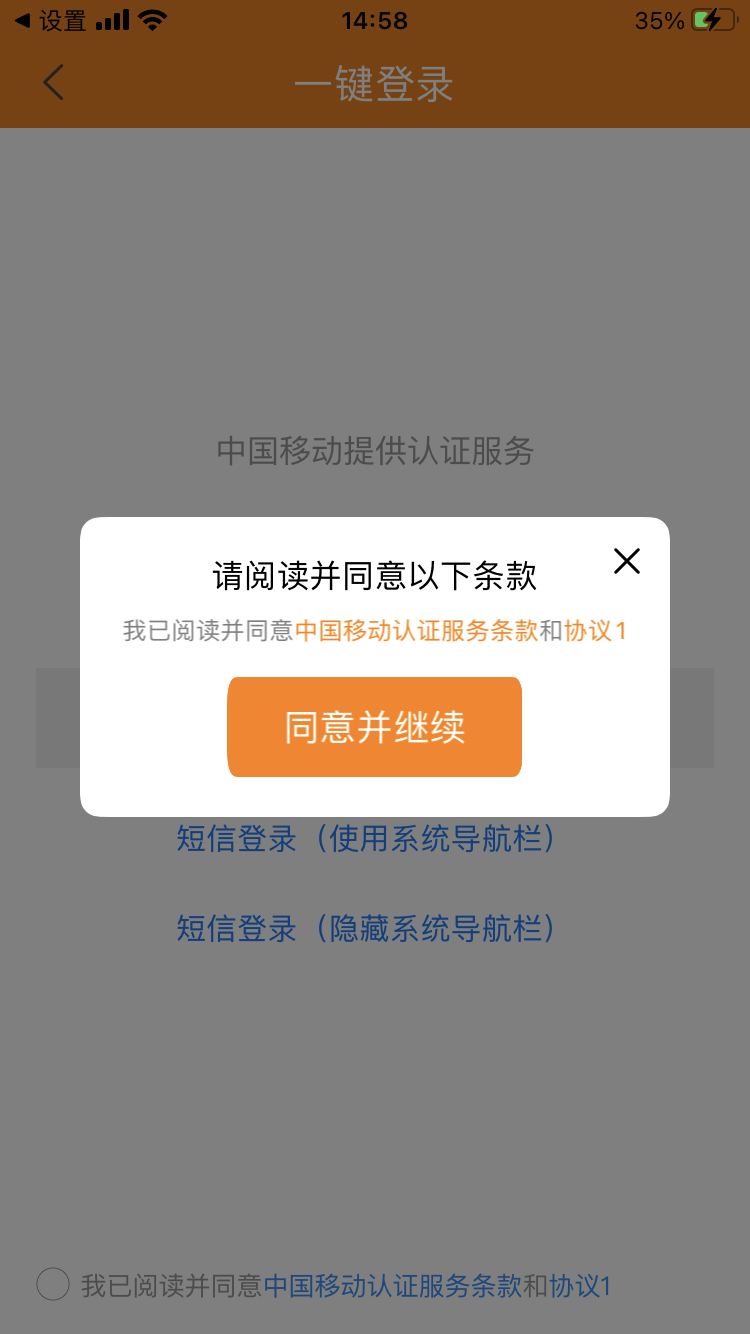
二次授权弹窗页面:
方法 | 参数类型 | 说明 |
privacyAlertIsNeedShow | BOOL | 设置二次隐私协议弹窗是否显示。取值:
说明 针对弹窗形式的授权页暂时不支持二次授权弹窗页面。 |
privacyAlertIsNeedAutoLogin | BOOL | 设置二次隐私协议弹窗点击按钮是否需要执行登录。取值:
|
privacyAlertEntryAnimation | CAAnimation | 设置二次隐私协议弹窗显示自定义动画,默认从下往上位移动画。 |
privacyAlertExitAnimation | CAAnimation | 设置二次隐私协议弹窗隐藏自定义动画,默认从上往下位移动画。 |
privacyAlertCornerRadiusArray | NSArray<NSNumber *> | 设置二次隐私协议弹窗的四个圆角值。 说明 顺序为左上,左下,右下,右上,需要填充4个值,不足4个值则无效,如果值小于等于0则为直角。 |
privacyAlertBackgroundColor | UIColor | 设置二次隐私协议弹窗背景颜色。 |
privacyAlertAlpha | CGFloat | 设置二次隐私协议弹窗透明度,默认值1.0。 说明 设置范围0.3~1.0。 |
privacyAlertTitleFont | UIFont | 设置二次隐私协议弹窗标题文字大小。 |
privacyAlertTitleColor | UIColor | 设置二次隐私协议弹窗标题文字颜色。 |
privacyAlertTitleBackgroundColor | UIColor | 设置二次隐私协议弹窗标题背景颜色。 |
privacyAlertTitleAlignment | NSTextAlignment | 设置二次隐私协议弹窗标题位置,默认居中。 |
privacyAlertContentFont | UIFont | 设置二次隐私协议弹窗协议内容文字大小,默认值13 dp,最小值12 dp。 |
privacyAlertContentBackgroundColor | UIColor | 设置二次隐私协议弹窗协议内容背景颜色。 |
privacyAlertContentColors | NSArray<UIColor *> | 设置二次隐私协议弹窗协议内容颜色数组。 说明 默认值[#999999,#1890FF],[非点击文案颜色,点击文案颜色]。 |
privacyAlertContentAlignment | NSTextAlignment | 设置二次隐私协议弹窗协议文案居中、居左,默认居左。 |
privacyAlertBtnBackgroundImages | NSArray<UIImage *> | 设置二次隐私协议弹窗按钮背景图片。 |
privacyAlertButtonTextColors | NSArray<UIColor *> | 设置二次隐私协议弹窗按钮文字颜色。 |
privacyAlertButtonFont | UIFont | 设置二次隐私协议弹窗按钮文字大小,默认值18 dp,最小值10 dp。 |
privacyAlertCloseButtonIsNeedShow | BOOL | 设置二次隐私协议弹窗关闭按钮是否显示。
|
privacyAlertCloseButtonImage | UIImage | 设置二次隐私协议弹窗右侧关闭按钮图片。 |
privacyAlertMaskIsNeedShow | BOOL | 设置二次隐私协议弹窗背景蒙层是否显示。
|
tapPrivacyAlertMaskCloseAlert | BOOL | 设置二次隐私协议弹窗点击背景蒙层是否关闭弹窗。
|
privacyAlertMaskColor | UIColor | 设置二次隐私协议弹窗蒙版背景颜色。 |
privacyAlertMaskAlpha | CGFloat | 设置二次隐私协议弹窗蒙版透明度,默认值0.5。 说明 设置范围0.3~1.0。 |
privacyAlertMaskEntryAnimation | CAAnimation | CAAnimation |
privacyAlertMaskExitAnimation | CAAnimation | 设置二次隐私协议弹窗蒙版消失动画,默认渐隐动画。 |
privacyAlertFrameBlock | PNSBuildFrameBlock | 设置二次隐私协议弹窗尺寸。 说明 默认值:20 px,(SH-100)*0.5 px,(SW-40) px,100 px。不能超出父视图,高度不小于50 px,宽度不小于0 px。 |
privacyAlertTitleFrameBlock | PNSBuildFrameBlock | 设置二次隐私协议弹窗标题尺寸。 说明 不能超出父视图,最小宽度100 px,最小高度15 px。 |
privacyAlertPrivacyContentFrameBlock | PNSBuildFrameBlock | 设置二次隐私协议弹窗内容尺寸。 说明 从标题顶部位置开始,不能超出父视图。 |
privacyAlertButtonFrameBlock | PNSBuildFrameBlock | 设置二次隐私协议弹窗确认并继续按钮尺寸。 说明 居中显示,不能超出父视图。最小宽度40 px,最小高度20 px。 |
privacyAlertCloseFrameBlock | PNSBuildFrameBlock | 设置二次隐私协议弹窗右侧关闭按钮尺寸。 说明 不能超出父视图。 |
SDK接入demo用例
一键登录唤起授权页
用例代码详情可参考demo工程代码,如果不想调用accelerateLoginPageWithTimeout,也能正常拉起页面,也可提前调用拉取缓存
NSString*info =@"客户的秘钥串";
    __weak typeof(self) weakSelf =self;
//设置SDK参数,app生命周期内调用一次即可
[UMCommonHandler setVerifySDKInfo:info complete:^(NSDictionary*_Nonnull resultDic){
    [weakSelf showResult:resultDic];
}];

    __block BOOL support = YES;
[UMCommonHandler checkEnvAvailableWithAuthType:UMPNSAuthTypeLoginToken complete:^(NSDictionary*_Nullable resultDic){
        support =[PNSCodeSuccess isEqualToString:[resultDic objectForKey:@"resultCode"]];
}];

//1. 调用取号接口,加速授权页的弹起
[UMCommonHandler accelerateLoginPageWithTimeout:timeout complete:^(NSDictionary*_Nonnull resultDic){
    if([PNSCodeSuccess isEqualToString:[resultDic objectForKey:@"resultCode"]]== NO){
        [ProgressHUD showError:@"取号,加速授权页弹起失败"];
        [weakSelf showResult:resultDic];
    return;
}
//2. 调用获取登录Token接口,可以立马弹起授权页
[ProgressHUD dismiss];
[UMCommonHandler getLoginTokenWithTimeout:timeout controller:weakSelf model:model complete:^(NSDictionary*_Nonnull resultDic){
    NSString*code =[resultDic objectForKey:@"resultCode"];
    if([PNSCodeLoginControllerPresentSuccess isEqualToString:code]){
        [ProgressHUD showSuccess:@"弹起授权页成功"];
    }elseif([PNSCodeLoginControllerClickCancel isEqualToString:code]){
        [ProgressHUD showSuccess:@"点击了授权页的返回"];
    }elseif([PNSCodeLoginControllerClickChangeBtn isEqualToString:code]){
        [ProgressHUD showSuccess:@"点击切换其他登录方式按钮"];
    }elseif([PNSCodeLoginControllerClickLoginBtn isEqualToString:code]){
        if([[resultDic objectForKey:@"isChecked"] boolValue]== YES){
            [ProgressHUD showSuccess:@"点击了登录按钮,check box选中,SDK内部接着会去获取登陆Token"];
        }else{
            [ProgressHUD showSuccess:@"点击了登录按钮,check box选中,SDK内部不会去获取登陆Token"];
        }
    }elseif([PNSCodeLoginControllerClickCheckBoxBtn isEqualToString:code]){
        [ProgressHUD showSuccess:@"点击check box"];
    }elseif([PNSCodeLoginControllerClickProtocol isEqualToString:code]){
        [ProgressHUD showSuccess:@"点击了协议富文本"];
    }elseif([PNSCodeSuccess isEqualToString:code]){
        //点击登录按钮获取登录Token成功回调
       NSString*token =[resultDic objectForKey:@"token"];
        //下面拿Token去服务器换手机号,下面仅做参考
        [PNSVerifyTopRequest requestLoginWithToken:token complete:^(BOOL isSuccess,NSString*_Nonnull msg,NSDictionary*_Nonnull data){
        NSString*popCode =[data objectForKey:@"code"];
        NSDictionary*module=[data objectForKey:@"module"];
        NSString*mobile =module[@"mobile"];
        if([popCode isEqualToString:@"OK"]&& mobile.length >0){
            [ProgressHUD showSuccess:@"一键登录成功"];
        }else{
            [ProgressHUD showSuccess:@"一键登录失败"];
        }
                    dispatch_async(dispatch_get_main_queue(),^{
        [UMCommonHandler cancelLoginVCAnimated:YES complete:nil];
    });
    [weakSelf showResult:data];
}];
    }else{
        [ProgressHUD showError:@"获取登录Token失败"];
    }
        [weakSelf showResult:resultDic];
    }];
}];
授权页全屏模式,横竖屏切换
UMCustomModel*model =[[UMCustomModel alloc] init];
    model.navColor =UIColor.orangeColor;
    model.navTitle =[[NSAttributedString alloc] initWithString:@"一键登录(全屏)" attributes:@{NSForegroundColorAttributeName:UIColor.whiteColor,NSFontAttributeName:[UIFont systemFontOfSize:20.0]}];
//model.navIsHidden = NO;
    model.navBackImage =[UIImage imageNamed:@"icon_nav_back_light"];
//model.hideNavBackItem = NO;
UIButton*rightBtn =[UIButton buttonWithType:UIButtonTypeSystem];
[rightBtn setTitle:@"更多" forState:UIControlStateNormal];
    model.navMoreView = rightBtn;
    model.privacyNavColor =UIColor.orangeColor;
    model.privacyNavBackImage =[UIImage imageNamed:@"icon_nav_back_light"];
    model.privacyNavTitleFont =[UIFont systemFontOfSize:20.0];
    model.privacyNavTitleColor =UIColor.whiteColor;
    model.logoImage =[UIImage imageNamed:@"taobao"];
//model.logoIsHidden = NO;
//model.sloganIsHidden = NO;
    model.sloganText =[[NSAttributedString alloc] initWithString:@"一键登录slogan文案" attributes:@{NSForegroundColorAttributeName:UIColor.orangeColor,NSFontAttributeName:[UIFont systemFontOfSize:16.0]}];
    model.numberColor =UIColor.orangeColor;
    model.numberFont =[UIFont systemFontOfSize:30.0];
    model.loginBtnText =[[NSAttributedString alloc] initWithString:@"一键登录" attributes:@{NSForegroundColorAttributeName:UIColor.whiteColor,NSFontAttributeName:[UIFont systemFontOfSize:20.0]}];
//model.autoHideLoginLoading = NO;
//model.privacyOne = @[@"《隐私1》",@"https://www.taobao.com/"];
//model.privacyTwo = @[@"《隐私2》",@"https://www.taobao.com/"];
    model.privacyColors =@[UIColor.lightGrayColor,UIColor.orangeColor];
    model.privacyAlignment =NSTextAlignmentCenter;
    model.privacyFont =[UIFont fontWithName:@"PingFangSC-Regular" size:13.0];
    model.privacyOperatorPreText =@"《";
    model.privacyOperatorSufText =@"》";
//model.checkBoxIsHidden = NO;
    model.checkBoxWH =17.0;
    model.changeBtnTitle =[[NSAttributedString alloc] initWithString:@"切换到其他方式" attributes:@{NSForegroundColorAttributeName:UIColor.orangeColor,NSFontAttributeName:[UIFont systemFontOfSize:18.0]}];
//model.changeBtnIsHidden = NO;
//model.prefersStatusBarHidden = NO;
    model.preferredStatusBarStyle =UIStatusBarStyleLightContent;
//model.presentDirection = UMPNSPresentationDirectionBottom;
//授权页默认控件布局调整
//model.navBackButtonFrameBlock =
//model.navTitleFrameBlock =
    model.navMoreViewFrameBlock =^CGRect(CGSize screenSize,CGSize superViewSize,CGRect frame){
CGFloat width = superViewSize.height;
CGFloat height = width;
returnCGRectMake(superViewSize.width -15- width,0, width, height);
};
    model.loginBtnFrameBlock =^CGRect(CGSize screenSize,CGSize superViewSize,CGRect frame){
if([self isHorizontal:screenSize]){
            frame.origin.y =20;
return frame;
}
return frame;
};
    model.sloganFrameBlock =^CGRect(CGSize screenSize,CGSize superViewSize,CGRect frame){
if([self isHorizontal:screenSize]){
returnCGRectZero;//横屏时模拟隐藏该控件
}else{
returnCGRectMake(0,140, superViewSize.width, frame.size.height);
}
};
    model.numberFrameBlock =^CGRect(CGSize screenSize,CGSize superViewSize,CGRect frame){
if([self isHorizontal:screenSize]){
            frame.origin.y =140;
}
return frame;
};
    model.loginBtnFrameBlock =^CGRect(CGSize screenSize,CGSize superViewSize,CGRect frame){
if([self isHorizontal:screenSize]){
            frame.origin.y =185;
}
return frame;
};
    model.changeBtnFrameBlock =^CGRect(CGSize screenSize,CGSize superViewSize,CGRect frame){
if([self isHorizontal:screenSize]){
returnCGRectZero;//横屏时模拟隐藏该控件
}else{
returnCGRectMake(10, frame.origin.y, superViewSize.width -20,30);
}
};
//model.privacyFrameBlock =
//添加自定义控件并对自定义控件进行布局
    __block UIButton*customBtn =[UIButton buttonWithType:UIButtonTypeCustom];
[customBtn setTitle:@"这是一个自定义控件" forState:UIControlStateNormal];
[customBtn setBackgroundColor:UIColor.redColor];
    customBtn.frame =CGRectMake(0,0,230,40);
    model.customViewBlock =^(UIView*_Nonnull superCustomView){
[superCustomView addSubview:customBtn];
};
    model.customViewLayoutBlock =^(CGSize screenSize,CGRect contentViewFrame,CGRect navFrame,CGRect titleBarFrame,CGRect logoFrame,CGRect sloganFrame,CGRect numberFrame,CGRect loginFrame,CGRect changeBtnFrame,CGRect privacyFrame){
CGRect frame = customBtn.frame;
        frame.origin.x =(contentViewFrame.size.width - frame.size.width)*0.5;
        frame.origin.y =CGRectGetMinY(privacyFrame)- frame.size.height -20;
        frame.size.width = contentViewFrame.size.width - frame.origin.x *2;
        customBtn.frame = frame;
};
// 横竖屏切换
model.supportedInterfaceOrientations =UIInterfaceOrientationMaskAllButUpsideDown;
// 仅支持竖屏
model.supportedInterfaceOrientations =UIInterfaceOrientationMaskPortrait;
// 仅支持横屏
model.supportedInterfaceOrientations =UIInterfaceOrientationMaskLandscape;
授权页弹窗模式,支持横竖屏切换
UMCustomModel*model =[[UMCustomModel alloc] init];
    model.alertCornerRadiusArray =@[@10,@10,@10,@10];
//model.alertCloseItemIsHidden = YES;
    model.alertTitleBarColor =UIColor.orangeColor;
    model.alertTitle =[[NSAttributedString alloc] initWithString:@"一键登录(弹窗)" attributes:@{NSForegroundColorAttributeName:UIColor.whiteColor,NSFontAttributeName:[UIFont systemFontOfSize:20.0]}];
    model.alertCloseImage =[UIImage imageNamed:@"icon_close_light"];
    model.privacyNavColor =UIColor.orangeColor;
    model.privacyNavBackImage =[UIImage imageNamed:@"icon_nav_back_light"];
    model.privacyNavTitleFont =[UIFont systemFontOfSize:20.0];
    model.privacyNavTitleColor =UIColor.whiteColor;
    model.logoImage =[UIImage imageNamed:@"taobao"];
//model.logoIsHidden = NO;
//model.sloganIsHidden = NO;
    model.sloganText =[[NSAttributedString alloc] initWithString:@"一键登录slogan文案" attributes:@{NSForegroundColorAttributeName:UIColor.orangeColor,NSFontAttributeName:[UIFont systemFontOfSize:16.0]}];
    model.numberColor =UIColor.orangeColor;
    model.numberFont =[UIFont systemFontOfSize:30.0];
    model.loginBtnText =[[NSAttributedString alloc] initWithString:@"一键登录" attributes:@{NSForegroundColorAttributeName:UIColor.whiteColor,NSFontAttributeName:[UIFont systemFontOfSize:20.0]}];
//model.autoHideLoginLoading = NO;
//model.privacyOne = @[@"《隐私1》",@"https://www.taobao.com/"];
//model.privacyTwo = @[@"《隐私2》",@"https://www.taobao.com/"];
    model.privacyColors =@[UIColor.lightGrayColor,UIColor.orangeColor];
    model.privacyAlignment =NSTextAlignmentCenter;
    model.privacyFont =[UIFont fontWithName:@"PingFangSC-Regular" size:13.0];
    model.privacyOperatorPreText =@"《";
    model.privacyOperatorSufText =@"》";
//model.checkBoxIsHidden = NO;
    model.checkBoxWH =17.0;
    model.changeBtnTitle =[[NSAttributedString alloc] initWithString:@"切换到其他方式" attributes:@{NSForegroundColorAttributeName:UIColor.orangeColor,NSFontAttributeName:[UIFont systemFontOfSize:18.0]}];
//model.changeBtnIsHidden = NO;
//model.prefersStatusBarHidden = NO;
//model.preferredStatusBarStyle = UIStatusBarStyleDefault;
//model.presentDirection = UMPNSPresentationDirectionBottom;
CGFloat ratio = MAX(UM_SCREEN_WIDTH, UM_SCREEN_HEIGHT)/667.0;
//实现该block,并且返回的frame的x或y大于0,则认为是弹窗谈起授权页
    model.contentViewFrameBlock =^CGRect(CGSize screenSize,CGSize contentSize,CGRect frame){
CGFloat alertX =0;
CGFloat alertY =0;
CGFloat alertWidth =0;
CGFloat alertHeight =0;
if([self isHorizontal:screenSize]){
            alertX = ratio * UM_Alert_Horizontal_Default_Left_Padding;
            alertWidth = screenSize.width - alertX *2;
            alertY =(screenSize.height - alertWidth *0.5)*0.5;
            alertHeight = screenSize.height -2* alertY;
}else{
            alertX = UM_Alert_Default_Left_Padding * ratio;
            alertWidth = screenSize.width - alertX *2;
            alertY = UM_Alert_Default_Top_Padding * ratio;
            alertHeight = screenSize.height - alertY *2;
}
returnCGRectMake(alertX, alertY, alertWidth, alertHeight);
};
//授权页默认控件布局调整
//model.alertTitleBarFrameBlock =
//model.alertTitleFrameBlock =
//model.alertCloseItemFrameBlock =
    model.logoFrameBlock =^CGRect(CGSize screenSize,CGSize superViewSize,CGRect frame){
if([self isHorizontal:screenSize]){
returnCGRectZero;//横屏时模拟隐藏该控件
}else{
            frame.origin.y =10;
return frame;
}
};
    model.sloganFrameBlock =^CGRect(CGSize screenSize,CGSize superViewSize,CGRect frame){
if([self isHorizontal:screenSize]){
returnCGRectZero;//横屏时模拟隐藏该控件
}else{
            frame.origin.y =110;
return frame;
}
};
    model.numberFrameBlock =^CGRect(CGSize screenSize,CGSize superViewSize,CGRect frame){
if([self isHorizontal:screenSize]){
            frame.origin.y =20;
            frame.origin.x =(superViewSize.width *0.5- frame.size.width)*0.5+18.0;
}else{
            frame.origin.y =140;
}
return frame;
};
    model.loginBtnFrameBlock =^CGRect(CGSize screenSize,CGSize superViewSize,CGRect frame){
if([self isHorizontal:screenSize]){
            frame.origin.y =60;
            frame.size.width = superViewSize.width *0.5;//登录按钮最小宽度是其父视图的一半,再小就不生效了
}else{
            frame.origin.y =180;
}
return frame;
};
    model.changeBtnFrameBlock =^CGRect(CGSize screenSize,CGSize superViewSize,CGRect frame){
if([self isHorizontal:screenSize]){
returnCGRectZero;//横屏时模拟隐藏该控件
}else{
returnCGRectMake(10,240, superViewSize.width -20,30);
}
};
//model.privacyFrameBlock =
//添加自定义控件并对自定义控件进行布局
    __block UIButton*customBtn =[UIButton buttonWithType:UIButtonTypeCustom];
[customBtn setTitle:@"这是一个自定义控件" forState:UIControlStateNormal];
[customBtn setBackgroundColor:UIColor.redColor];
    model.customViewBlock =^(UIView*_Nonnull superCustomView){
[superCustomView addSubview:customBtn];
};
    model.customViewLayoutBlock =^(CGSize screenSize,CGRect contentViewFrame,CGRect navFrame,CGRect titleBarFrame,CGRect logoFrame,CGRect sloganFrame,CGRect numberFrame,CGRect loginFrame,CGRect changeBtnFrame,CGRect privacyFrame){
CGFloat padding =15;
CGFloat x =0;
CGFloat y =0;
CGFloat width =0;
CGFloat height =0;
if([self isHorizontal:screenSize]){
            x =CGRectGetMaxX(loginFrame)+ padding;
            y = padding;
            width = contentViewFrame.size.width - x - padding;
            height =CGRectGetMinY(privacyFrame)- y - padding;
}else{
            x = padding;
            y = MAX(CGRectGetMaxY(changeBtnFrame),CGRectGetMaxY(loginFrame))+ padding;
            width = contentViewFrame.size.width -2* x;
            height =CGRectGetMinY(privacyFrame)- y - padding;
}
        customBtn.frame =CGRectMake(x, y, width, height);
};
// 横竖屏切换
model.supportedInterfaceOrientations =UIInterfaceOrientationMaskAllButUpsideDown;
// 仅支持竖屏
model.supportedInterfaceOrientations =UIInterfaceOrientationMaskPortrait;
// 仅支持横屏
model.supportedInterfaceOrientations =UIInterfaceOrientationMaskLandscape;
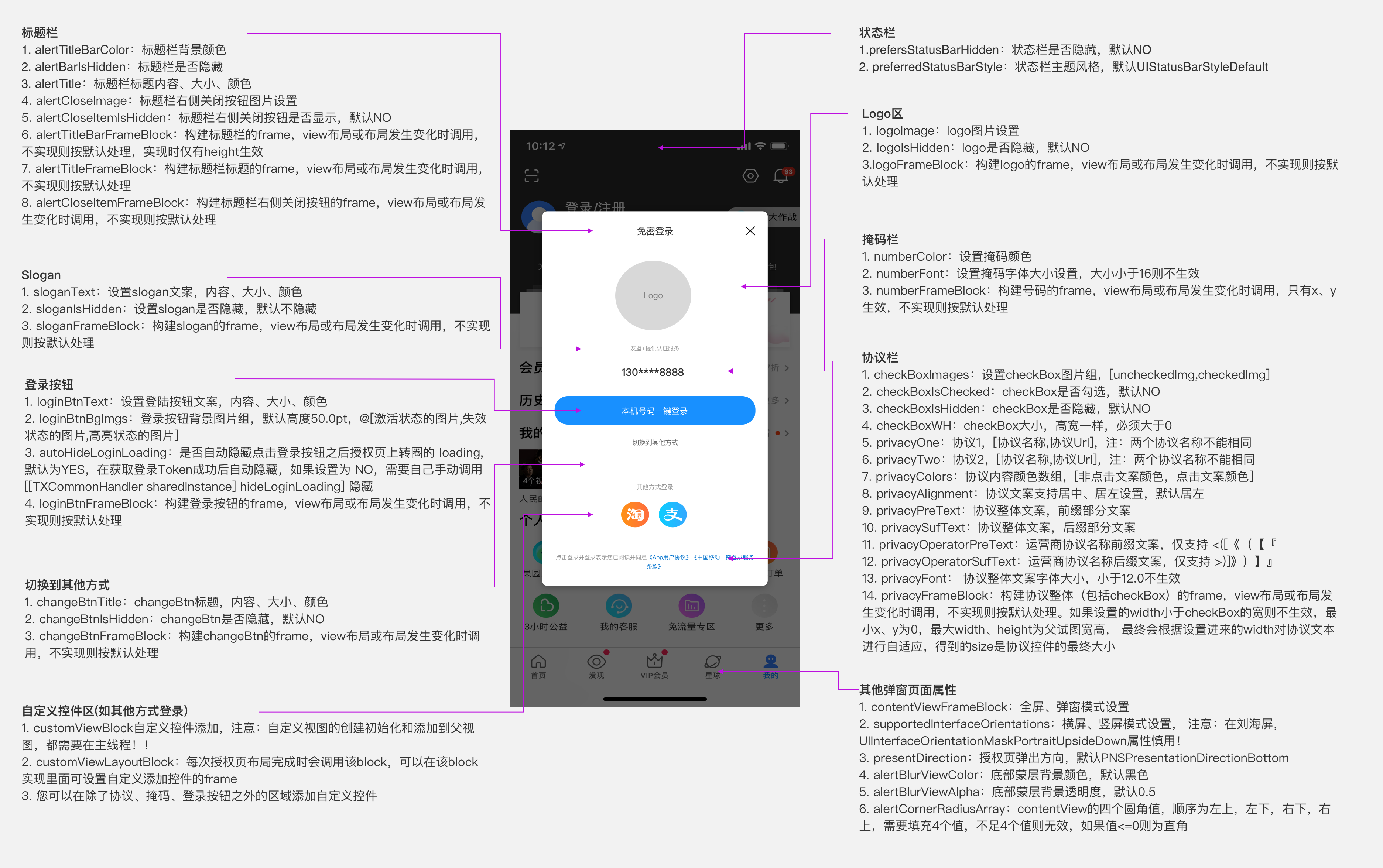
一键登录授权页面说明
全屏授权页面设计规范(支持横竖屏,以竖屏示意)
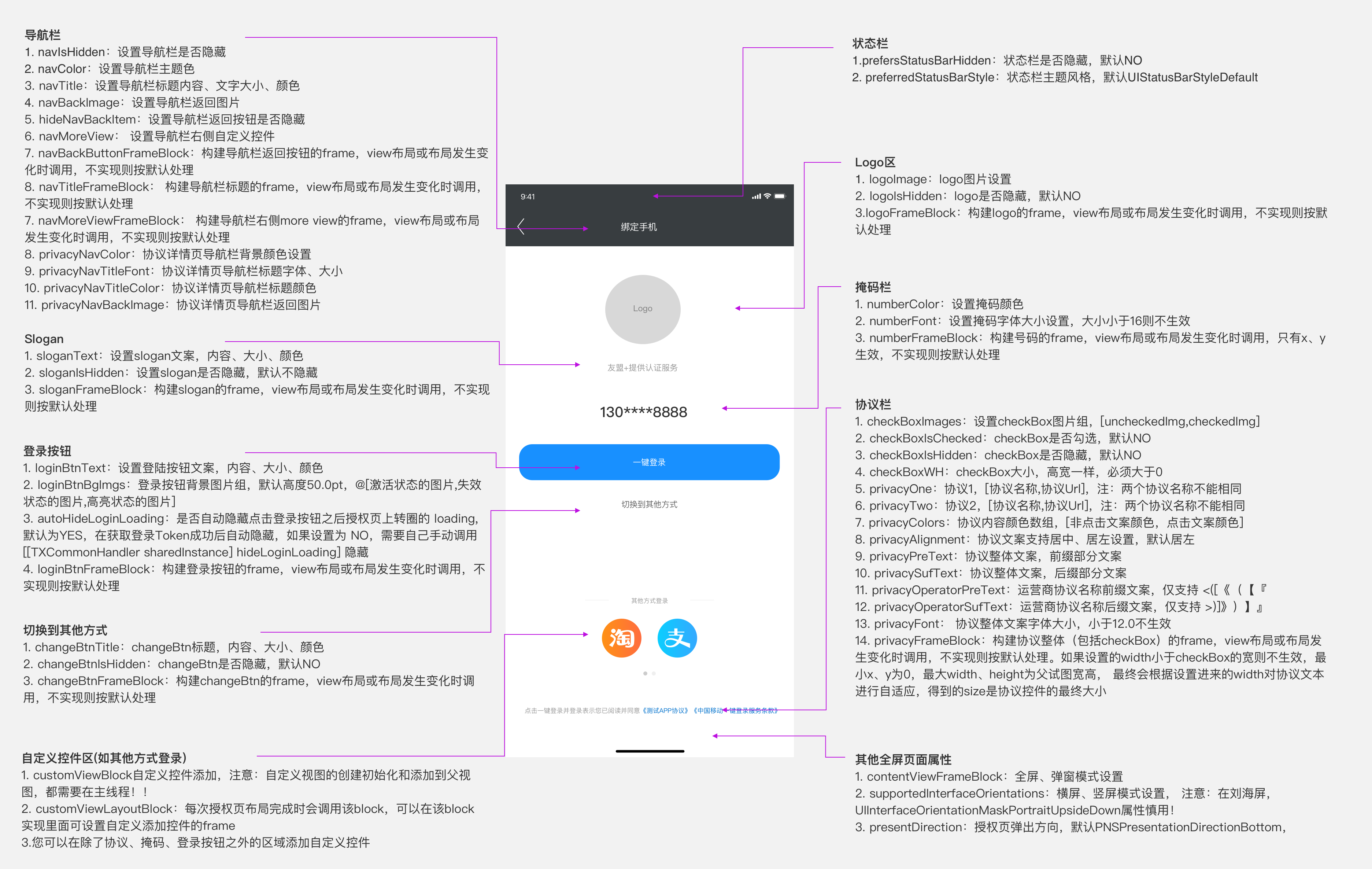
弹窗授权页面设计规范(支持横竖屏,以竖屏示意)